Make (formerly Integromat) — Complete AI Tool Review
Zapier demonstrated that non-technical business users could automate app integrations — and the market responded by making Zapier the most widely used automation tool in the world. Make went further. Where Zapier excels at simple trigger-action connectors, Make built a genuine visual workflow engine that handles the multi-step, multi-branch, data-transforming, error-handling automation complexity that real business operations actually require.
The addition of native AI modules for OpenAI, Anthropic Claude, and Google Gemini transforms Make from a data connector into an intelligent automation platform. At any step in any workflow, you can add AI decision-making: classify incoming data, generate content, extract structured information from unstructured text, evaluate sentiment, route based on AI judgment, or generate personalized outputs. This positions Make as the automation platform for the AI era — not just connecting apps but adding intelligence to every business process.
Make Core Features — Complete Guide
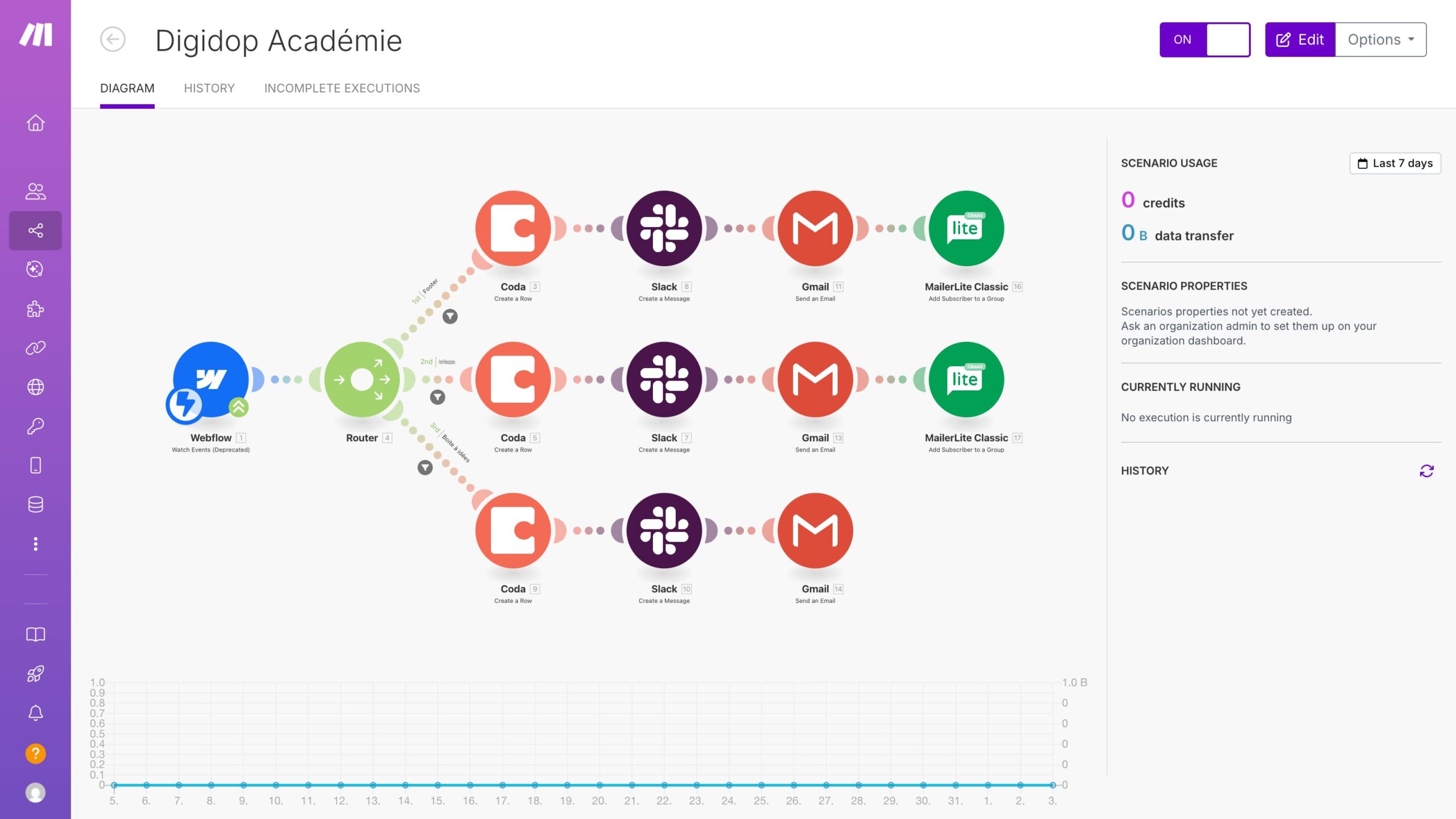
- Visual Scenario Builder: Build automation workflows by dragging modules onto a canvas and drawing connections between them. Each module represents one application action — ‘Get new form submission from Typeform’, ‘Send data to OpenAI for classification’, ‘Create task in ClickUp’, ‘Send Slack notification’. The visual representation makes complex automations comprehensible at a glance — you can trace data flow, understand conditions, and debug failures by following the visual path of data through the scenario. This visual clarity is Make’s core UX advantage over code-based automation and over Zapier’s simpler but less flexible sequential interface.
- Native AI Modules — OpenAI, Anthropic, Google AI: Make includes fully-featured modules for all major AI providers, allowing AI to be inserted at any step in any workflow. OpenAI module capabilities: GPT-4 completions for content generation and reasoning, DALL-E image generation, Whisper audio transcription, text embeddings for similarity search, and function calling for structured AI outputs. Anthropic Claude module: access to Claude Sonnet and Opus models for complex reasoning, long-context processing, and content generation tasks requiring nuance and accuracy. Google AI module: Gemini for multimodal processing including image understanding, document analysis, and multilingual content generation. AI modules are configured visually with no code — set your prompt, model, parameters, and connect inputs and outputs to other modules.
- Data Transformer (The Underrated Killer Feature): Business automation frequently fails at the data transformation layer — the point where data from one application needs to be reformatted for use by another. Make’s built-in transformation tools handle this without code: text parsers that extract specific information using patterns, date formatters that convert between date formats and time zones, math operators for calculations, string manipulators for text processing, array iterators for processing lists, JSON and XML parsers for structured data, and markdown converters. What previously required a developer to write custom middleware can now be configured visually in Make.
- Advanced Logic: Routers, Iterators, Aggregators: Make handles automation logic that Zapier simply cannot process. Routers branch the workflow into multiple paths based on conditions — Route A if customer type is Enterprise, Route B if SMB, Route C if non-profit. Iterators process each item in a list separately — process each line item in an invoice, each attendee in a meeting list, each contact in a CRM export. Aggregators collect the results of multiple operations into a single output — gather all AI-classified items and compile them into a summary report. These logical operations allow Make to model real business processes rather than just simple one-step integrations.
- Error Handling and Production Monitoring: Production automation fails. APIs return errors, data is malformed, rate limits are hit, external services go down. Make’s error handling lets you define explicitly what happens when each module fails: retry with exponential backoff, route to an error-handling branch, send an alert notification, log the failure for manual review, or break the scenario gracefully. The Monitoring dashboard shows every scenario execution with status, data processed, execution time, and error details. This makes Make suitable for mission-critical business automation rather than just nice-to-have convenience workflows.
- Webhooks for Real-Time Automation: Make scenarios trigger instantly from incoming webhook calls — not just on schedules. This enables real-time automation: a form submitted on your website fires a webhook → Make receives it instantly → AI qualifies the lead → CRM record created → Slack notification sent → automated email dispatched — all in under 5 seconds. Webhooks are available from the Core plan upward and work with any service that can send HTTP requests, making Make connectable to virtually any modern application regardless of whether it has a specific Make module.
- Team Collaboration and 1,000+ Templates: Share scenarios across team members with role-based access control — different team members can view, edit, or administer scenarios based on permissions. A library of 1,000+ pre-built scenario templates for common business automation use cases is downloadable and customizable — dramatically reducing build time for standard workflows. Templates cover CRM automation, e-commerce order processing, social media management, HR onboarding, financial reporting, content publishing, and AI-enhanced business processes.
Make Pricing — All Plans
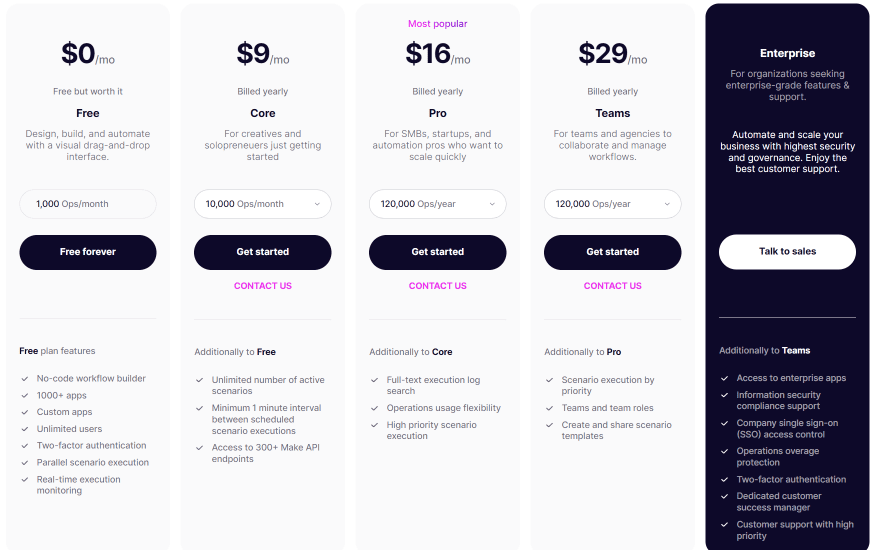
Free: 1,000 operations/month, unlimited apps, 2 active scenarios, 15-minute execution interval minimum. Sufficient for evaluating the platform and running low-frequency automations.
Core ($9/month): 10,000 operations/month, unlimited scenarios, 1-minute minimum execution interval, full data transformer access, all modules including AI providers.
Pro ($16/month): 10,000 operations/month, all Core features, custom variables for dynamic scenarios, full execution history, priority queue execution, and advanced error handling.
Teams ($29/month): 10,000 operations/month, team management, shared templates, team folders, access control, and team member permissions. The plan for organizations managing automation across multiple departments.
Enterprise (Custom): Dedicated infrastructure, custom operation volumes, SSO, SLA guarantees, HIPAA compliance options, dedicated customer success manager, and custom integration support.
Make vs Zapier — The Definitive Comparison
Use Zapier when: you need simple trigger-action integrations configured in minutes, you use niche or specialized tools not yet in Make’s library (Zapier has 7,000+ integrations vs Make’s 1,500), or your team is completely non-technical and needs absolute maximum simplicity. Use Make when: your automations require conditional logic, data transformation, loops, or multi-branch routing; you want to add AI decision-making to workflow steps; your operation volume makes Zapier pricing prohibitive (Zapier Professional at $49/month = 2,000 tasks; Make Pro at $16/month = 10,000 operations — 70-80% cheaper at equivalent scale); or you need production-grade error handling and monitoring.