

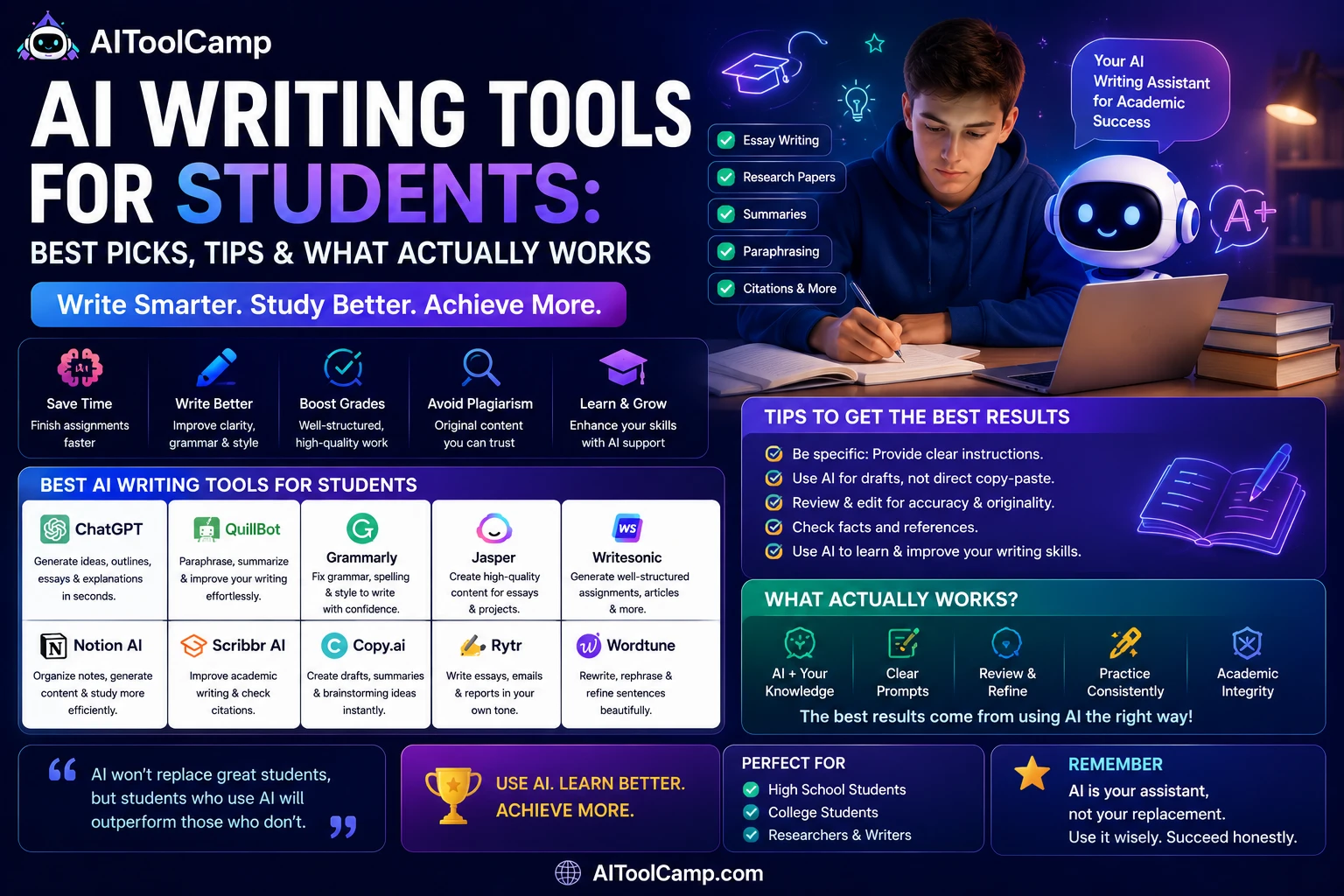
What Are AI Writing Tools for Students?
AI writing tools are software programs that use artificial intelligence — specifically large language models (LLMs) like GPT-4, Claude, and Gemini — to help users plan, draft, edit, and improve written content. For students, these tools have become indispensable companions across high school essays, undergraduate research papers, thesis writing, and professional internship applications.
Unlike simple spell-checkers, modern AI writing assistants understand context, tone, argument structure, and academic style. They can take a rough paragraph and transform it into a polished, coherent argument, or turn a vague prompt into a detailed essay outline in seconds.
🎓 Key insight: The global AI writing market is projected to exceed $6.5 billion by 2030, with students representing one of the fastest-growing user segments. Learning to use these tools effectively is now a core academic skill.
Before diving in, explore our AI Content Tools for the full landscape of AI-powered content.
AI writing tools serve students across multiple functions:
- Essay drafting and outlining — generate structured first drafts from a topic or prompt
- Grammar and style correction — fix errors and elevate academic tone
- Paraphrasing and summarization — condense research papers or rephrase complex passages
- Citation assistance — generate properly formatted references in APA, MLA, or Chicago style
- Research support — find, summarize, and organize source material
- Brainstorming — overcome writer’s block and generate topic ideas instantly
Why Students Need AI Writing Assistants in 2026
The pressure on modern students has never been greater. Between coursework deadlines, part-time jobs, internships, and social commitments, the average student struggles to dedicate the time quality writing demands. AI writing tools don’t replace a student’s thinking — they amplify it.
The Real Problems AI Writing Tools Solve
Writer’s Block: The single biggest obstacle for most students is getting started. An AI tool can generate an outline or opening paragraph in seconds, breaking through the paralysis of the blank page.
Non-Native English Speakers: International students writing in English as a second, third, or fourth language benefit enormously from AI grammar and style tools like Grammarly that catch nuanced errors native speakers rarely make.
Research Overload: With thousands of papers published daily, AI tools that can summarize and synthesize academic research save students hours of reading time.
Consistency and Tone: Maintaining a consistent academic voice across a 5,000-word dissertation is genuinely difficult. AI assistants flag tone shifts and suggest adjustments.
📊 Stat: A 2024 Stanford study found that students who used AI writing assistants as editing tools — not ghostwriters — scored an average of 18% higher on essay clarity and argument coherence than those who didn’t.
Best AI Writing Tools for Students (Reviewed)
After testing over 30 tools, here are the top AI writing tools that genuinely deliver for students at every level — from high school to postgraduate research.
Freemium
1. ChatGPT (OpenAI)
The most versatile AI writing assistant for any academic task — from brainstorming to full essay drafts.
- Instant essay outlines and drafts
- Understands complex academic prompts
- Free tier available (GPT-3.5)
- GPT-4o for advanced reasoning
- Works for all subjects
Freemium
2. Grammarly
The gold standard for grammar, style, clarity, and plagiarism checking — essential for every student.
- Real-time grammar correction
- Tone detector for academic writing
- Plagiarism checker (Premium)
- Browser extension for all platforms
- Integrates with Google Docs & Word
Freemium
3. QuillBot
Best AI paraphrasing and summarization tool — perfect for rephrasing sources without plagiarism.
- Multiple paraphrase modes
- Summarizer for long articles
- Citation generator built in
- Grammar checker included
- Free tier is genuinely useful
Freemium
4. Notion AI
AI writing inside your notes — ideal for students who already organize research in Notion.
- AI writes inside your workspace
- Summarize lecture notes instantly
- Generate study guides from text
- Project and deadline management
- Great for thesis and research projects
Freemium
5. Perplexity AI
AI-powered research assistant that finds and cites real sources — the smarter way to start research.
- Provides real-time cited answers
- Links to academic and news sources
- Ask follow-up questions naturally
- Great for research topic exploration
- Free tier available
Free
NotebookLM (Google)
Freemium — the standout research tool for 2026, actively being recommended over ChatGPT for source-based academic writing
- Grounds every answer strictly in the sources you upload — no hallucinated facts
- Upload lecture notes, PDFs, or research papers and ask direct questions
- Auto-generates study guides, FAQs, and timelines from your material
- Ideal for literature reviews and evidence-based essays
- Free during 2026 preview
Hemingway Editor
Free / Premium — best for tightening prose, not generating it
- Flags overly complex sentences, passive voice, and adverb overuse
- Grades readability so you can match your target academic level
- No AI generation — purely an editing lens, which makes it safe to use under strict academic integrity policies
- Works as a final polish pass after drafting
Gemini (Google Docs)
Free with Google Workspace — inline writing suggestions as you type
- Built directly into Docs, so there’s no copy-paste workflow
- Offers clarity and conciseness suggestions similar to spellcheck
- Good middle ground between full generation and manual editing
- Free for eligible students through Google’s education program
6. Claude (Anthropic)
Exceptional for long-form essay writing with nuanced reasoning — handles 100K+ token documents.
- Superior long-form writing quality
- Uploads and analyzes PDFs and docs
- Strong academic tone and structure
- Less likely to hallucinate facts
- Free tier is highly capable
Freemium
7. Jenni AI
Purpose-built for academic writing — includes in-text citations and autocomplete while you type.
- Academic citation autocomplete
- Built-in research paper assistant
- Paraphrase and rewrite sections
- Designed specifically for students
- APA, MLA, Chicago citation support
Freemium
8. Writesonic
Great for students who also create content — blog posts, application essays, and scholarship letters.
- 100+ writing templates
- AI article writer with SEO mode
- Personal statement templates
- Multilingual writing support
- Generous free word allowance
Head-to-Head Comparison Table
| Tool | Best For | Free Plan | Plagiarism Check | Citations | Pricing (Paid) |
|---|---|---|---|---|---|
| ChatGPT | All-purpose writing & drafting | ✅ GPT-3.5 | ❌ | ⚠️ Manual | $20/month |
| Grammarly | Grammar & style editing | ✅ Basic | ✅ Premium | ❌ | $12/month |
| QuillBot | Paraphrasing & summarizing | ✅ Limited | ✅ Premium | ✅ Free | $9.95/month |
| Notion AI | Research notes & organization | ⚠️ Trial | ❌ | ❌ | $10/month add-on |
| Perplexity AI | Research with live citations | ✅ Good | ❌ | ✅ Auto | $20/month |
| Claude | Long-form academic writing | ✅ Excellent | ❌ | ⚠️ Manual | $20/month |
| Jenni AI | Academic papers & citations | ✅ 200 words/day | ✅ Built-in | ✅ Auto | $12/month |
| Writesonic | Creative & application essays | ✅ 10k words | ❌ | ❌ | $16/month |
Use Cases: How Students Are Using AI Writing Tools
📝 Essay Writing and Structuring
The most common use case. A student inputs their thesis statement or essay prompt and asks ChatGPT or Claude to generate a structured outline. From there, they write each section themselves — using the AI as a scaffold, not a ghostwriter. This approach is academically ethical and proven to improve final draft quality.
📚 Research Paper Summarization
Tools like Perplexity AI and Claude can ingest entire academic PDFs and produce crisp, accurate summaries. A student researching climate policy can upload 15 papers and get a synthesized summary of key arguments in minutes — a task that previously took a full afternoon.
✏️ Grammar and Style Improvement
Grammarly remains the #1 tool for real-time editing. Its AI detects passive voice overuse, wordy sentences, inconsistent tense, and tone mismatches. For non-native English writers, it’s essentially a personal editor available 24/7.
🔄 Paraphrasing Sources Ethically
QuillBot’s paraphrase tool helps students reword source material to avoid accidental plagiarism — a common issue when students closely follow source texts while note-taking. Multiple paraphrase modes (Fluency, Academic, Creative) give fine-grained control over the output.
📖 Generating Study Notes and Flashcards
Notion AI and ChatGPT can transform dense lecture slides or textbook chapters into concise bullet-point notes, study guides, and even practice questions — making revision dramatically more efficient.
📄 Personal Statements and Scholarship Applications
Writesonic and ChatGPT help students draft compelling personal statements for university applications, scholarships, and internship cover letters — while students provide the personal narrative and refine the voice.
Best Free AI Writing Tools for Students
Budget is a real constraint for most students. The good news: several top-tier AI writing tools offer genuinely capable free tiers that handle 80% of student writing needs.
💡 Top Free Picks:
🥇 Claude (Anthropic) Free — Best free AI for long-form academic writing. No word limit per session.
🥈 ChatGPT Free (GPT-3.5) — Excellent for brainstorming, outlining, and quick drafts.
🥉 Grammarly Basic — Solid grammar correction free forever.
🏅 QuillBot Free — 125 words/paraphrase limit but the paraphraser and summarizer work well.
🏅 Perplexity AI Free — Research with real-time cited sources at no cost.
How to Use AI Writing Tools Ethically & Avoid Plagiarism
This is the question every student, teacher, and institution is grappling with. Using AI writing tools does not automatically mean academic dishonesty — but how you use them absolutely matters.
✅ Ethical Uses of AI in Student Writing
- Using AI to generate an outline that you then build upon yourself
- Running your completed draft through Grammarly for grammar and style corrections
- Using QuillBot to paraphrase source material you’ve already understood
- Asking AI to explain a complex concept in simpler terms for better understanding
- Using AI to brainstorm counterarguments to strengthen your position
❌ Unethical Uses of AI in Student Writing
- Submitting AI-generated text as your own original work without disclosure
- Using AI to complete exams or assessments that prohibit outside assistance
- Copying AI content without reading or understanding it
- Using AI to generate citations that you haven’t verified actually exist
⚠️ AI Detection Warning: Most universities now use tools like Turnitin’s AI detection, GPTZero, and Originality.ai. These are imperfect but increasingly accurate. Always use AI as a writing assistant, write substantially in your own voice, and check your institution’s specific AI use policy before submission.
Is Originality.ai Worth It for Students?
Originality.ai is primarily an AI-detection tool, not a writing tool — but it’s increasingly relevant to students for the opposite reason most think. Instead of using it to “beat” detection, the smarter use case is running your own AI-assisted drafts through it before submission, to see what your professor’s detector might flag, so you can go back and revise sections that read as too AI-generated. It integrates with Grammarly-style workflows and is one of the tools most commonly cited alongside Turnitin and GPTZero in university AI policies.
How to Make AI-Generated Text Undetectable (The Right Way)
The legitimate approach: use AI to produce a rough framework, then rewrite every paragraph in your own voice, with your own examples, arguments, and evidence. The result should be authentically yours — the AI just helped you get unstuck faster.
Pro Tips to Get the Most Out of AI Writing Tools
1. Be Specific with Your Prompts
Vague prompts produce vague outputs. Instead of “Write an essay about climate change,” try: “Write a 500-word argumentative essay introduction for a university audience on why carbon pricing is more effective than regulatory mandates for reducing industrial emissions. Use a formal academic tone.” The more context you give, the better the output.
2. Always Fact-Check AI Outputs
AI models can “hallucinate” — generate plausible-sounding but entirely fictional facts, statistics, or citations. Never include an AI-generated statistic or reference in academic work without independently verifying it from the original source.
3. Use Multiple Tools for Different Stages
The smartest students combine tools: Perplexity for research → ChatGPT or Claude for drafting → Grammarly for editing → QuillBot for paraphrasing sources → Jenni AI for citation generation. Each tool excels at a different part of the writing process.
4. Iterate, Don’t Accept First Drafts
Ask AI to draft something, then respond with specific feedback: “Make this more concise,” “Add a counterargument to paragraph 2,” “Rewrite this in a more formal academic tone.” Iterative prompting produces exponentially better results than one-shot generation.
5. Use AI to Learn, Not Just Produce
Ask the AI to explain why it made certain writing choices. This turns the tool into a writing tutor, helping you build genuine skills that transfer to timed exams where no AI assistance is available.
Frequently Asked Questions
What are the best AI writing tools for students in 2026?
ChatGPT and Claude are the best all-purpose AI writing tools for students in 2026. For grammar correction, Grammarly is unmatched. For paraphrasing and citations, QuillBot leads. For research with live sources, use Perplexity AI. The best approach is to combine 2–3 tools for different stages of the writing process.
Are AI writing tools free for students?
Yes — Claude, ChatGPT (GPT-3.5), Grammarly Basic, QuillBot Free, and Perplexity AI all offer free tiers that cover most student writing needs. Paid upgrades (typically $10–20/month) unlock more advanced features like plagiarism checking, longer outputs, and premium AI models.
Is using AI writing tools cheating?
Not inherently. Using AI tools for brainstorming, grammar correction, outlining, or paraphrasing is generally acceptable and similar to using a dictionary or thesaurus. Submitting AI-generated content as original work without disclosure violates most institutions’ academic integrity policies. Always check your school’s specific AI use policy.
Can AI writing tools help with college application essays?
Yes, AI tools are highly useful for college application essays — for brainstorming angles, structuring narratives, and polishing grammar. However, the personal story, experiences, and voice must be authentically yours. Admissions officers are skilled at detecting generic, AI-polished essays that lack genuine personality.
Which AI tool is best for academic research papers?
Jenni AI is purpose-built for academic papers with built-in citation support. Perplexity AI is excellent for research discovery with live citations. Claude handles very long documents and can analyze uploaded PDFs — ideal for literature reviews. Combine Perplexity for research, Claude for analysis, and Jenni AI for writing with citations.
Do AI writing tools work for non-English speaking students?
Absolutely. ChatGPT, Claude, and Grammarly support dozens of languages. For students writing in English as a second language, Grammarly’s real-time grammar and tone correction is especially valuable. ChatGPT can also help translate ideas from your native language into polished English academic prose.
Final Verdict: Which AI Writing Tool Should You Use?
There’s no single “best” AI writing tool for every student — the right choice depends on what stage of writing you’re in and what you need help with most. Here’s the simplest decision framework:
🎯 If you’re stuck at the blank page: Start with ChatGPT or Claude to generate outlines and first drafts.
📝 If you need grammar and style help: Install Grammarly as a browser extension — it works everywhere.
🔍 If you’re doing research: Use Perplexity AI for cited answers and Claude to analyze uploaded PDFs.
📖 If you’re paraphrasing sources: QuillBot is the most reliable and ethical choice.
📄 If you need citations automatically: Jenni AI or QuillBot’s citation generator are your best options.
The students who thrive with AI writing tools are not those who use AI to write for them — they’re the ones who use AI to write better. Think of these tools as a 24/7 writing tutor, research assistant, and editor combined. Master the workflow, use each tool for what it does best, and you’ll produce academic work that’s both faster and higher quality than anything you could produce alone.
For more AI tools that power business content creation, explore: AI content creation tools on AIToolCamp.
For more AI Copywriting Tools, Explore: Best AI Copywriting Tools
If you’re building a complete marketing automation stack, see our guide on AI marketing tools for small business.
For social media-specific AI tools that pair with video content, visit our AI social media tools directory.