
In the modern corporate, academic, and creative landscapes, time is the single most valuable currency. Traditionally, creating a high-stakes professional presentation, a comprehensive business document, or a clean landing page meant sacrificing hours—if not days—to the gods of manual formatting. Professionals found themselves trapped in a grueling cycle of alignment tweaks, font consistency audits, image resizing, and layout restructuring across traditional software suites like Microsoft PowerPoint or Google Slides.
Enter Gamma App.
Gamma is not just an incremental upgrade to the classic presentation software model; it represents a fundamental paradigm shift. By leveraging advanced artificial intelligence and an innovative, fluid canvas, Gamma eliminates the tedious mechanics of design, allowing creators to focus entirely on their core ideas and narrative structure.
In this exhaustive, definitive review of the Gamma App, we will deconstruct its architecture, analyze its core functionalities, evaluate its user experience, scrutinize its pricing tiers, weigh its real-world pros and cons, and determine whether this tool deserves a permanent home in your professional or academic workflow.
At its foundational core, Gamma is an AI-native content creation platform designed to break down the artificial walls that have long separated presentations, documents, and web pages. Historically, if you wanted to pitch an idea, you wrote a brief in Microsoft Word, built a deck in PowerPoint, and perhaps deployed a basic landing page on a website builder. Gamma collapses this fragmented workflow into a singular, cohesive ecosystem.
Instead of working with rigid, static slide dimensions (such as the standard 16:9 widescreen format), Gamma introduces a flexible, fluid canvas based on “cards.” These cards function as dynamic containers of information that gracefully expand or contract based on the volume and nature of the content within them.
Through its generative AI engine, Gamma allows users to input a simple natural language prompt—or upload an existing text document—and receive a beautifully structured, highly visual, and fully articulated piece of content in return. The platform is highly versatile, empowering users to create a diverse array of assets:
Presentations: High-impact pitch decks, keynotes, sales pitches, and lecture slides.
Documents: Multi-page reports, corporate memos, project briefs, training manuals, and employee onboarding handbooks.
Web Pages: Single-page portfolios, event landing pages, product launch sites, and internal company wikis.
Client Proposals & Statements of Work (SOWs): Visually engaging, legally structured business proposals that clients can read like a doc or view like a presentation.
Marketing Materials: Interactive newsletters, brand overviews, and content summaries designed for digital distribution.
Gamma bridges the gap between text-heavy documentation and visually driven design work. It treats words not just as static letters on a page, but as the semantic blueprint for automated, professional layout generation.
The power of Gamma lies within its tightly integrated feature set. It does not merely overlay basic AI text generation on top of a standard editing grid; it weaves artificial intelligence into every layer of its design interface, asset library, and content engine.
The crown jewel of the Gamma ecosystem is its generative engine. When launching a new project, the AI walks you through an interactive onboarding wizard. You specify whether you want a presentation, document, or webpage, and provide a text prompt. This prompt can range from a brief sentence (“A marketing deck for a new organic skincare line targetting Gen Z”) to a detailed outline or a copy-pasted wall of text from an unformatted research paper.
Within seconds, the AI produces an editable outline. Users can refine, reorder, or expand this outline before the engine commits to generating the actual visual assets. Once approved, Gamma fills out the slides, dynamically selects matching color palettes, writes structured body text, applies hierarchical typography, and embeds relevant visual imagery.
Traditional slide construction requires constant micro-adjustments. If you add two sentences of text to a PowerPoint slide, your text box might overflow, forcing you to manually reduce the font size, shrink your images, or move elements to a new slide.
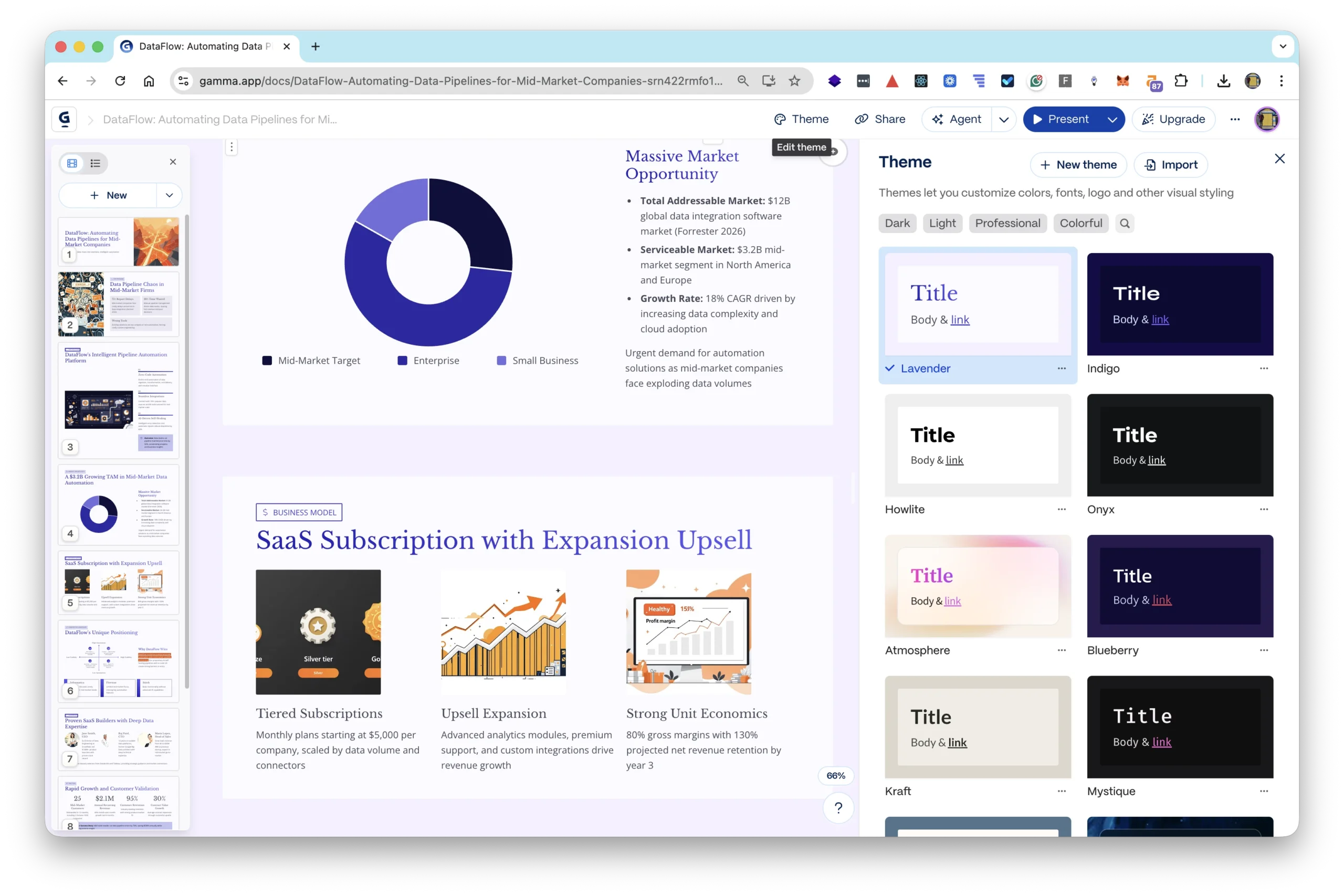
Gamma’s Smart Design Engine utilizes a responsive fluid layout system. The text and visual assets are housed inside modular blocks that adjust automatically to keep the layout proportional and aesthetically pleasing. If you add more text, the card extends vertically. If you drop in an extra image, the layout automatically splits into clean, balanced columns. The application of design themes is completely global; with a single click, you can swap the entire visual persona of your project—altering fonts, background styles, container shapes, and color accents—without breaking any underlying content structure.
Gamma’s AI does not stop working after the initial generation phase. It includes an inline, contextual AI assistant that acts as a co-editor. By highlighting a block of text or selecting a specific card, you can prompt the AI to execute highly precise editorial changes:
“Rewrite this paragraph to sound more professional and authoritative.”
“Condense these three sentences into a punchy, bulleted list.”
“Expand this single point with real-world examples of SaaS growth metrics.”
“Split this dense card into two separate slides with balanced visuals.”
This allows for a highly iterative, conversational editing experience where the user acts as the creative director and the AI functions as the lightning-fast production designer.
Static images and standard bullet points are often insufficient for modern digital presentations. Gamma acknowledges this by supporting deep, native integration of live web elements. Instead of linking out to external tabs—which breaks the flow of a presentation—users can embed interactive blocks directly into any Gamma card. Supported integrations include:
Media and Video: Native players for YouTube, Vimeo, Loom, and TikTok.
Data and Visualization: Dynamic charts, live Google Sheets, Airtable bases, and financial dashboards.
Websites and Prototypes: Fully interactive Figma designs, Framer mockups, or live web pages that users can scroll through and interact with mid-presentation.
Productivity and Forms: Typeform surveys, Google Forms, HubSpot lead capture fields, live Calendly scheduling widgets, and interactive digital calendars.
This interactivity transforms a basic slide deck into a living, operational document or application hub, making it an incredibly potent tool for sales teams, product managers, and educators.
Built for the modern distributed workforce, Gamma includes a robust collaborative layer that closely mirrors the seamless multi-user experience of Google Docs or Figma. Multiple team members can work within the same Gamma canvas simultaneously, viewing each other’s cursor movements in real time.
The platform supports granular commenting threads, allowing users to tag specific colleagues, leave feedback, and resolve editorial notes directly on individual cards. Version history tracking ensures that teams can experiment with radical design shifts or AI rewrites with the peace of mind that they can revert to a previous draft at any moment.
Gamma completely reimagines how content is delivered to an audience. While traditional software forces you to email heavy .pptx or .pdf file attachments, Gamma treats every project as a web-native asset. Clicking the “Share” button instantly publishes your project to a secure, high-speed URL.
Audiences can view your presentation in an optimized web reader that automatically scales to fit their screen size—whether they are opening it on an ultra-wide desktop monitor or a vertical smartphone screen. Furthermore, Gamma provides a built-in “Presentation Mode” that allows you to present directly out of your web browser, navigating seamlessly between fluid cards with smooth, cinematic transitions. For creators who wish to embed their decks into existing ecosystems, Gamma provides clean iframe embed codes for seamless integration into Notion spaces, corporate intranets, or custom websites.
The software interfaces of legacy presentation design suites can feel intimidating and cluttered. They often feature hundreds of nested menu items, complex toolbar configurations, and overwhelming layout properties. Gamma strips away this historical baggage in favor of an exceptionally clean, minimalist interface that prioritizes creative flow.
When a user logs into Gamma, they are greeted by a well-organized dashboard that separates personal workspaces from collaborative team folders. The editor workspace itself is beautifully sparse: the content canvas takes center stage, flanked by a floating, non-intrusive toolbar on the right side that houses your design building blocks (text formats, visual layouts, card templates, and integration modules).
The onboarding loop for absolute beginners is remarkably efficient. Because the generation process relies entirely on conversational text prompts, a user with zero design background, zero knowledge of typography pairing, and zero understanding of color theory can produce a presentation that looks like it was meticulously crafted by a professional design agency.
Compared to PowerPoint, which requires manual drawing of shapes and precise pixel-alignment, or Canva, which still requires you to manually browse thousands of templates and manually drag-and-drop assets into fixed placeholders, Gamma requires almost no mechanical overhead. The learning curve is practically flat. Advanced users can still unlock deeper custom controls—manually overriding specific card backgrounds, altering font variables, injecting custom CSS styling principles, and overriding automated layouts—but the platform’s default setting is automated excellence.
Gamma operates under a highly scalable freemium business model designed to accommodate casual, low-volume users while providing deep, unrestricted utility to enterprise teams and power users.
The Free Plan serves as a robust sandbox environment. Upon registration, users are granted a one-time allotment of 400 AI Credits. Every major AI action consumes a portion of these credits: creating a brand-new presentation from scratch generally costs around 40 credits, while smaller inline AI text rewrites or image generations cost significantly less.
The Free Plan includes access to basic themes, standard publishing capabilities, and real-time collaboration. However, it does come with certain compromises: all published web links and exported PDF documents carry a visible “Made with Gamma” watermark, AI image generation options are restricted to standard models, and advanced folder organization is locked.
Typically priced around $8 to $10 per user per month (billed annually), the Plus Plan is tailored for individual professionals, freelancers, and students who require high-volume generation without entering a costly enterprise bracket. The key upgrades in this tier include:
A recurring monthly injection of 1,500 AI Credits.
Complete removal of the “Made with Gamma” watermark from all shared links, presentations, and document exports.
Access to advanced file organization, including unlimited folders and nested sub-folders.
An extended version history window, allowing users to revert changes made up to 30 days prior.
The ability to upload custom fonts to maintain alignment with personal or basic brand guidelines.
Aimed at corporate power users, agencies, and cross-functional corporate teams, the Pro Plan typically sits at $15 to $20 per user per month (billed annually). This plan removes all functional barriers to unlock the full computational and stylistic potential of the platform:
Unlimited AI Credits: Users can generate an infinite number of presentations, documents, and web pages without ever checking a credit balance.
Access to advanced, state-of-the-art AI models for text generation and hyper-realistic, high-fidelity AI art generation directly within the canvas.
Full Custom Brand Kits: Teams can lock in proprietary corporate color schemes, official font packages, and pre-approved logo assets, ensuring that every single AI-generated card automatically adheres strictly to institutional brand books.
Detailed Engagement Analytics: Track exactly who views your shared Gamma links, which specific cards they spend the most time reading, where they drop off, and whether they interact with your embedded links or forms.
Priority customer support routing and early beta access to cutting-edge features.
Given that a traditional graphic designer or a specialized agency can charge thousands of dollars to design a single bespoke corporate pitch deck, Gamma’s pricing structure offers exceptional return on investment (ROI). For the cost of a couple of cups of coffee per month, individuals and teams can effectively automate their presentation design department.
To make an informed software adoption decision, it is essential to look past marketing claims and evaluate how a tool performs under real-world pressure. Below is an analytical breakdown of Gamma’s operational strengths and systemic limitations.
Unparalleled Speed to Draft: The time required to take a raw, unstructured concept and transform it into a polished, visual presentation is reduced by roughly 80% to 90% compared to legacy design workflows.
Intelligent, Bulletproof Formatting: The fluid layout system entirely eliminates formatting errors. Elements never clip out of bounds, text blocks never overlap awkwardly, and column spacing remains mathematically perfect regardless of edits.
Web-Native Versatility: The ability to toggle fluidly between a slide presentation view, a continuous document view, and a responsive live webpage gives content creators massive flexibility in how they package information.
Rich Structural Interactivity: Embedding live dashboards, working forms, and interactive prototypes directly into the slides creates a profoundly engaging experience for the end viewer.
Superb Out-of-the-Box Aesthetics: Gamma’s built-in theme engine utilizes sophisticated design principles. The color harmonies, typographical hierarchies, and whitespace distributions feel premium and contemporary.
Loss of Granular Pixel Control: Power users who are accustomed to manipulating design elements at the individual pixel level may find Gamma’s structured, block-based layout system restrictive. You cannot arbitrarily drag an image to a random coordinate on the screen; it must snap to the layout engine’s grid rules.
AI Fact-Checking Requirements: Because Gamma relies on large language models (LLMs) to write slide copy, it is susceptible to occasional “hallucinations.” Users must carefully audit and verify all historical facts, technical metrics, and statistical figures generated by the AI before sharing content publicly.
Credit Dependency on Lower Tiers: For users on the Free or Plus plans, a complex series of deep iterations, structural rewrites, and heavy asset changes can deplete their AI credit pool quickly, forcing manual editing or plan upgrades.
Export Rigidities: While Gamma supports exporting projects to Microsoft PowerPoint (.pptx) and Adobe PDF (.pdf), the translation is not always seamless. Because Gamma uses modern web layouts and fluid vertical cards, exporting to fixed widescreen PowerPoint slides can sometimes result in layout discrepancies that require manual cleanup in the destination application.
Gamma’s architectural flexibility makes it highly adaptable, but it provides specialized, transformative value to several specific professional and academic cohorts:
Marketers operate in a fast-paced environment where they must rapidly pitch campaign ideas, summarize market research, and present creative direction to clients. Gamma allows agencies to take a raw creative brief and spin up multiple distinct visual concepts or proposal variants in a fraction of the time, dramatically accelerating their client onboarding and pitch cycles.
For early-stage entrepreneurs, a pitch deck is a critical fundraising instrument. However, founders often lack the capital to hire dedicated design agencies. Gamma allows technical or business-focused founders to enter their raw business plans, competitive analyses, and financial projections into the prompt engine and receive a highly professional, visually stunning investor deck that looks polished and structured.
Sales reps can leverage Gamma’s dynamic web embeds and engagement analytics to build hyper-personalized client proposals. Instead of sending a static PDF, a sales rep can send a custom Gamma web link featuring an embedded video greeting, an interactive pricing calculator, and a live scheduling widget. The built-in analytics then notify the rep precisely when the client opens the proposal and which sections they evaluated most closely.
Creating fresh lecture materials for every class can be a massive administrative burden. Professors and teachers can paste dense textbook chapters or research syllabi into Gamma, and the AI will instantly break the information down into clear, digestible, student-friendly slide cards accompanied by contextual diagrams and illustrative graphics.
When subjected to rigorous operational testing, Gamma demonstrates exceptional performance metrics that outclass almost all conventional presentation tools on the market.
During standardized benchmark testing—evaluating the creation of an 8-slide corporate strategy presentation from a 500-word text prompt—the performance timeline breaks down as follows:
[00:00] Input Text Prompt / Select Configuration
[00:15] AI Generates Structured Outline (15 Seconds)
[00:30] Global Theme Selected / AI Processing Content
[01:15] Full Design & Text Completed (75 Seconds)
The rendering engine operates with zero noticeable lag. The generation of custom AI imagery occurs inline and takes roughly 10 to 15 seconds per asset, matching the performance profiles of top-tier standalone generative image models.
From a content integrity perspective, the structural coherence of Gamma’s presentations is remarkably high. The AI shows a sophisticated understanding of semantic hierarchies. For example, if the prompt requests a financial overview, the system automatically defaults to clean, structured balance sheets, multi-column comparison grids, and key performance indicator (KPI) callout metrics rather than simple blocks of text. It minimizes cognitive load for the reader by automatically bolding key phrases and creating parallel syntactic structures across bullet points.
A software tool is only as reliable as the support infrastructure surrounding it. Gamma has constructed a multi-layered support network designed to resolve technical challenges and inspire user creativity.
Comprehensive Knowledge Base: Gamma hosts an extensively indexed, searchable help center filled with step-by-step documentation, video walkthroughs, and troubleshooting guides covering everything from custom domain mapping for web pages to advanced embed configurations.
Direct Email and Ticketing Support: For billing inquiries or deep technical bugs, users can file support tickets directly through the application interface. Response times vary based on subscription tiers, but Pro users routinely experience fast turnaround times, often under a few hours.
Active Community Resources: Gamma cultivates an active community ecosystem where power users share custom themes, layout templates, and creative prompt formulas. This collaborative space serves as an excellent sounding board for discovering novel ways to maximize the platform’s utility.
Continuous Product Updates: The engineering team rolls out feature patches, performance enhancements, and new integration modules on a frequent basis, ensuring the platform evolves alongside the broader breakthroughs in artificial intelligence research.
Gamma App successfully transitions AI from a speculative novelty into an indispensable productivity tool. It correctly identifies that the primary bottleneck in presentation creation is not the conceptualization of ideas, but the friction of manual layout configuration and asset styling.
By automating the mechanical layout phase via a brilliant fluid card system and an intuitive generative AI, Gamma frees your mind to focus entirely on storytelling, logical sequencing, and messaging clarity. While it may not completely replace the highly specialized, pixel-perfect manual control required for massive corporate keynotes broadcast to thousands of people, it easily replaces 95% of everyday corporate, sales, academic, and marketing design tasks.
If your daily or weekly responsibilities require you to communicate ideas, pitch products, summarize data, or educate audiences, Gamma is an absolute must-have addition to your creative toolkit. It is a powerful software solution that saves time, enhances visual professionalism, and sets a new benchmark for what modern content creation software should be.
Speed & Efficiency: 9.9/10
Design Quality & Aesthetics: 9.6/10
Feature Versatility: 9.4/10
User Interface & Ease of Use: 9.7/10
Value for Money / Pricing: 9.1/10
Overall Analytical Rating: 9.54/10
For more AI tools that power business content creation, explore: AI content creation tools on AIToolCamp. If you’re building a complete marketing automation stack, see our guide on AI marketing tools for small business. For social media-specific AI tools that pair with video content, visit our AI social media tools directory.Everything you need to know about Gamma.app